Manage appointments
Join calls, mark them converted or no-show, cancel them, and understand what each action sends.
The Booking page lists upcoming and past calls with four counts at the top: upcoming, completed, converted, and no-shows. Open a call to see the booker’s email, timezone, and screening answers.
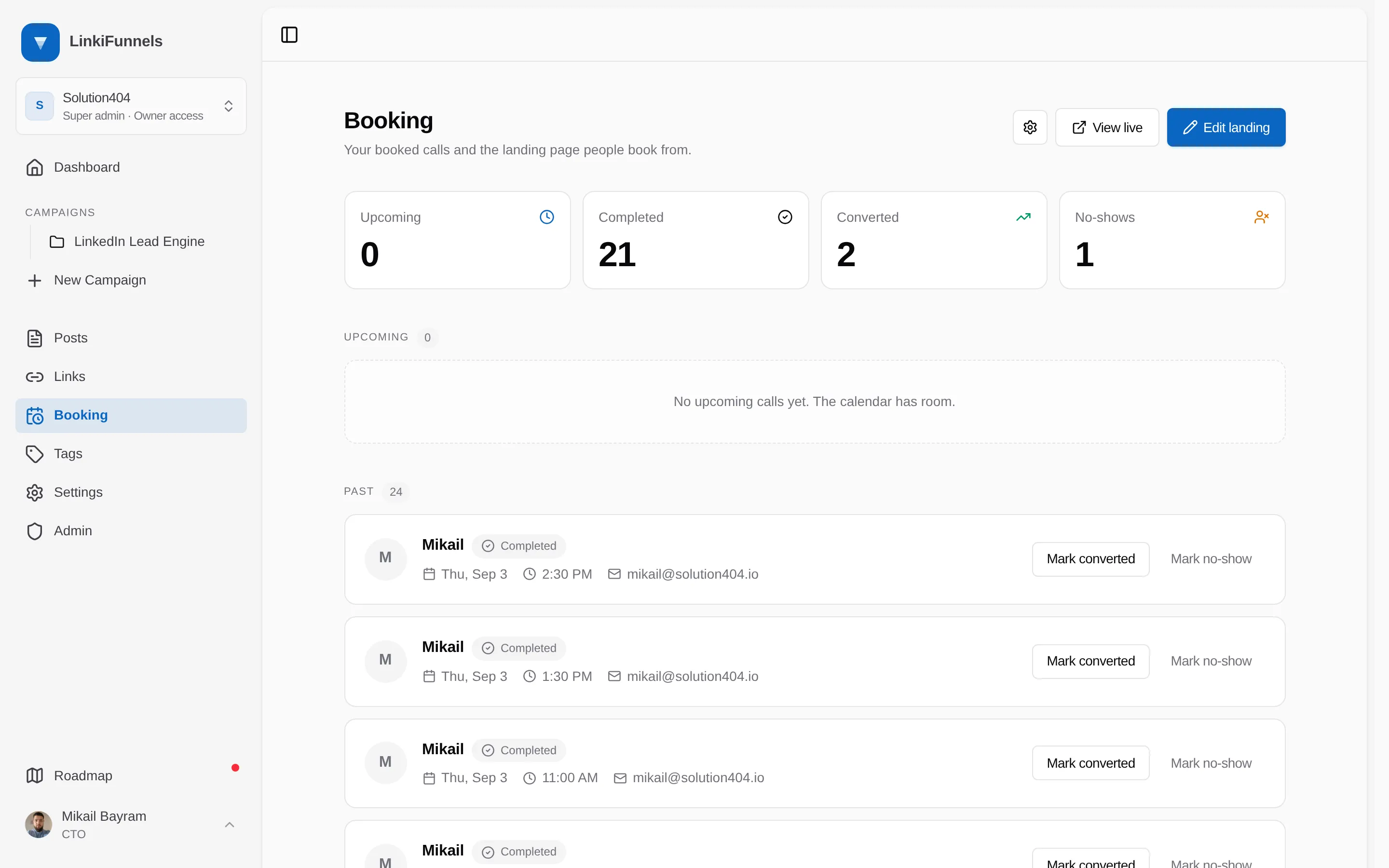
| Action | Available on | What happens |
|---|---|---|
| Join | Upcoming calls | Opens the Google Meet link |
| Cancel | Upcoming calls | Removes the event from your calendar and emails the booker |
| Mark converted | Past calls | Counts the call as converted in the tiles and campaign numbers. Nothing is sent |
| Mark no-show | Past calls | Counts a no-show and, if enabled in settings, emails the booker a link to reschedule |
Every booking is a contact
Section titled “Every booking is a contact”Whoever books a call becomes a contact in your workspace, matched by the email they booked with. If they already filled a form or received a campaign email, the call joins the person you already had rather than starting a second record. The call then shows on their contact page, and Booked a call in Contacts finds them.
See What a contact is.
Rescheduling
Section titled “Rescheduling”Every booking email includes a reschedule link. The booker picks a new time, the original call is canceled, and the new one keeps the same attribution. Each link works once. A no-show that reschedules is not counted as a no-show in the campaign numbers.