Read a contact page
What the header line, the Campaigns, Calls and Activity sheets, and the details rail tell you about one person.
Click any row in Contacts, or any recipient in a campaign, to open that person’s page. It answers one question: what is our whole history with this person.
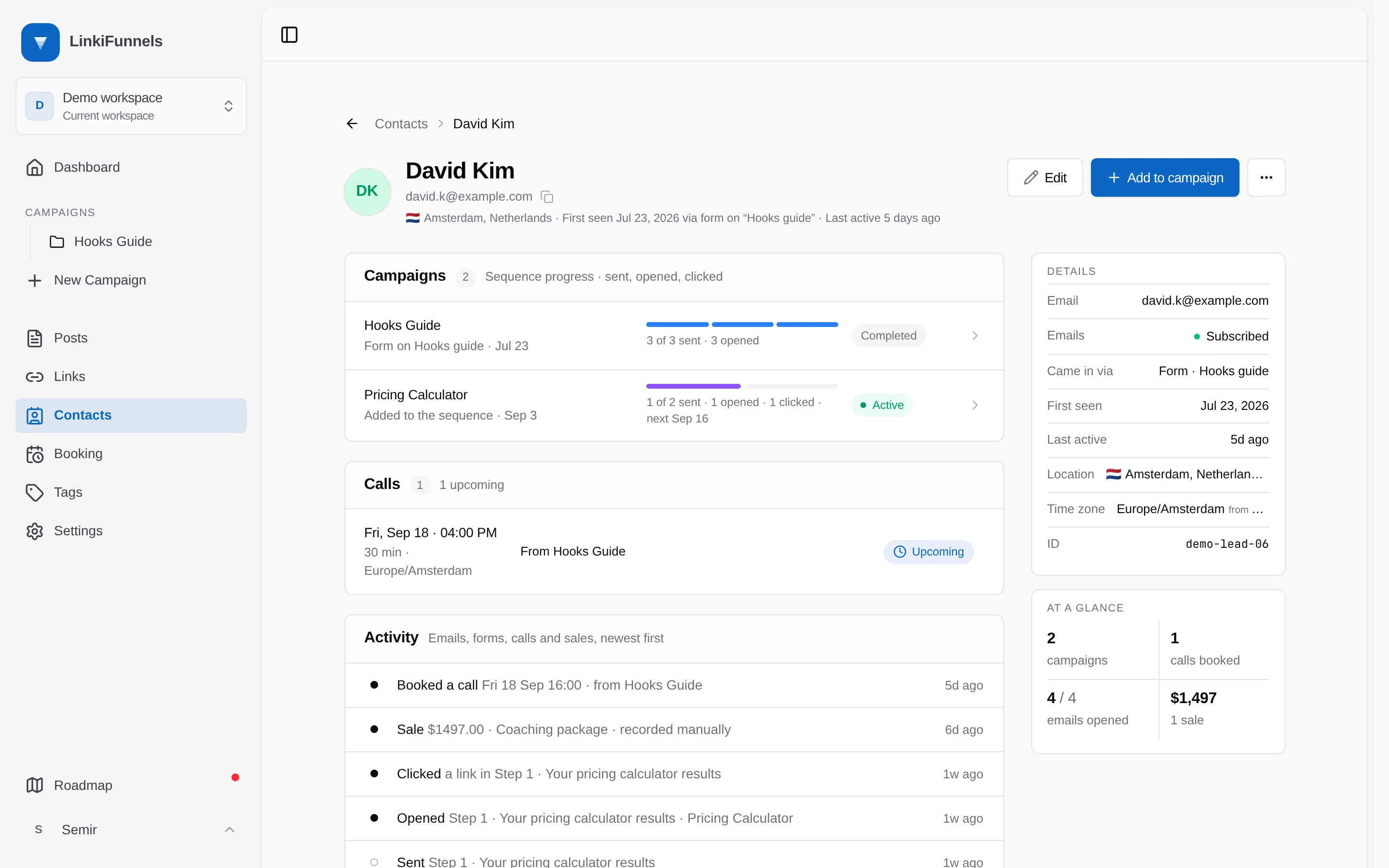
The header
Section titled “The header”Under the name sits one line of summary: where they are, when you first saw them and how, and when they were last active. For example, “Berlin, Germany · First seen 12 Aug 2026 via form on Playbook download · Last active 2 hours ago”.
The copy icon beside the email puts the address on your clipboard.
Campaigns
Section titled “Campaigns”One row for every campaign this person has touched, oldest first. The second line says how they entered that campaign and when, such as “Form on Playbook download · 12 Aug” or “Booked a call · 30 Aug”.
If they are in that campaign’s email sequence, the row shows a bar with one segment per email and a caption beneath it:
- Brand blue means sent.
- Blue means they opened it.
- Violet means they clicked a link in it.
- Grey means not sent yet.
The caption counts the same facts and adds the next send date while the sequence is running. The pill on the right is the enrollment itself: Active, Paused, Completed, or Stopped.
A campaign they touched but never entered the sequence for says “Not in the sequence”.
Upcoming calls first, then a Past band. Each row gives the time in the booker’s own time zone, the length, which campaign it came from, and a status: Scheduled, Completed, Converted, or No-show. Upcoming calls with a meeting link show Join call.
Activity
Section titled “Activity”Everything that ever happened, newest first: forms submitted, emails sent, opened, clicked and unsubscribed, calls booked, rescheduled, missed and converted, sales recorded, and sequence enrollments. Eight are shown, and Show n more reveals the rest.
A filled dot is something the person did. A hollow dot is something the system did, such as sending an email or enrolling them.
The rail
Section titled “The rail”Details lists the email address and whether you can still email it, how they came in, when you first saw them, when they were last active, and, when known, their location, their time zone, and your own id for them.
Location is derived rather than asked for, so it says where it came from: “from click” means the click that produced their first form lead, “from email” means the last email they opened or clicked. Time zone comes from a booking. Rows you have no data for are hidden rather than shown empty.
At a glance counts four things: campaigns touched, calls booked, emails opened out of emails sent, and revenue with the number of sales behind it.